|
htaccessサンプル/デフォルトページ設定
実際に動作するデフォルトページ設定のサンプルを掲載しています。 サンプルをご確認のうえ、htaccessファイル作成してください。 当サイトでは、htaccessの作成機能もありますので、是非ご利用ください。
サンプル(1)とサンプル(2)は、「default1」「default2」ディレクトリにそれぞれ同じファイルが置かれています。違いは、「.htaccess」の内容のみとなります。
1.サンプル1
下記をクリックすると右の画面が表示されます。
サンプルは、「/sample/default_page/default1/」ディレクトリにリンクされています。
同ディレクトリに配置されている「.htaccess」のデフォルト設定により「top.html」画面が表示されます。 |
 (画面イメージは異なります) |
「.htaccess」ファイル(☆1)
<Files ~ "^\.ht">
deny from all
</Files>
DirectoryIndex top.html index.html default.html
2.サンプル2
下記をクリックすると右の画面が表示されます。
サンプルは、「/sample/default_page/default2/」ディレクトリにリンクされています。 同ディレクトリに配置されている「.htaccess」のデフォルト設定により「default.html」画面が表示されます。 |
 (画面イメージは異なります) |
「.htaccess」ファイル(☆2)
<Files ~ "^\.ht">
deny from all
</Files>
DirectoryIndex default.html top.html index.html
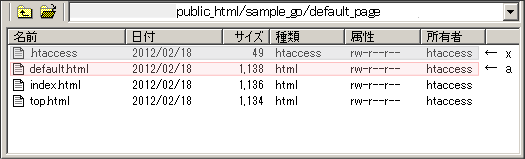
「.htaccess」および「.htpasswd」を配置したpath
| (1階層目) |
(2階層目) |
(3階層目) |
(4階層目) |
| /public_html |
/sample |
/default_page |
/default1 |
└.htaccess (共通htaccess) |
└default_page.html (当ページ) |
|
└.htaccess(前記☆1) |
└top.html (デフォルトページとなる) |
| └default.html |
| └index.html |
| /default2 |
| └.htaccess(前記☆2) |
| └top.html |
└default.html (デフォルトページとなる) |
| └index.html |
サンプルの動作環境
以下の環境でサンプル作成と動作確認を行っています。
| WEBサーバー |
Apache/2.2.3 |
| 動作確認OS |
Windows (XP以降) |
使用環境によってはサンプルが動作しない場合や、サンプル通りにhtaccessファイルを作成しても動作が異なる場合があります。 |